
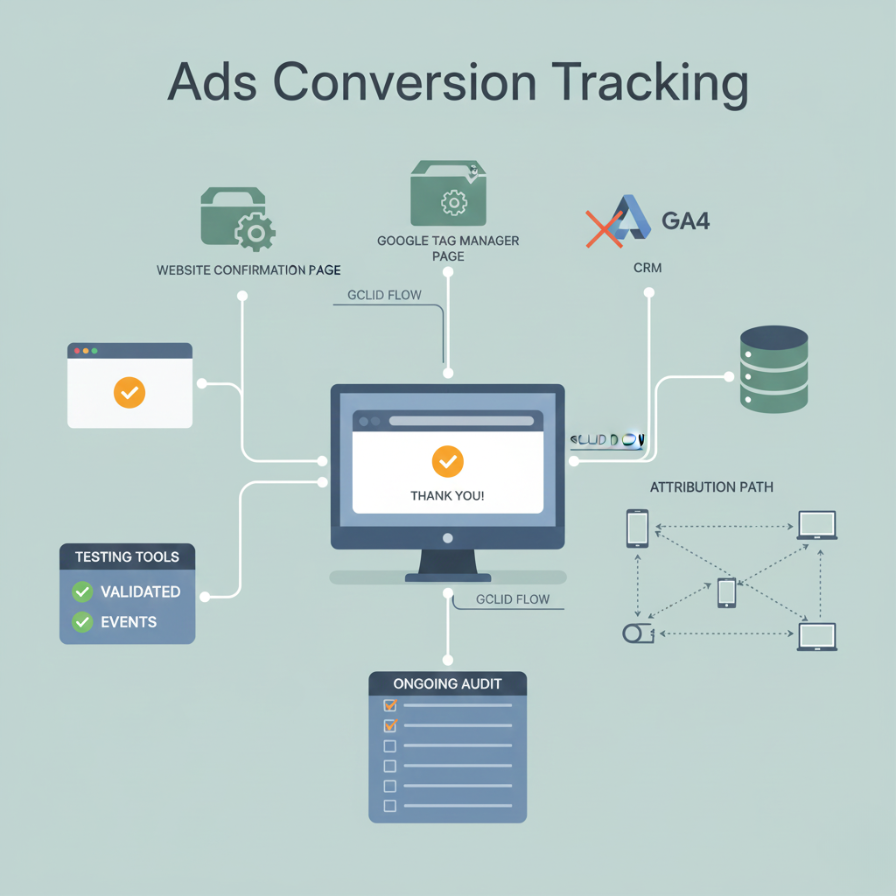
Accurate conversion tracking is the foundation of any profitable Google Ads program. Without reliable data, bidding algorithms cannot optimize, reporting becomes misleading, and decision-making is compromised.
This guide outlines the essential verification steps, technical requirements, and ongoing maintenance procedures needed to build a clean and dependable conversion-tracking framework.
1. Conversion-Tracking Verification & Setup Questions
Setup & Implementation Basics
A correct setup begins with defining the right conversion actions and ensuring they fire only on true outcomes not general site activity.
- Confirm that the correct conversion action has been created in Google Ads (e.g., actual form submission, purchase, or thank-you page event). Avoid tracking generic page views as conversions.
- Ensure the Google Ads tag or conversion snippet is placed only on the final confirmation page, not site-wide.
- If using Google Tag Manager (GTM), verify that triggers fire exclusively on actionable conversion events not page load or button clicks that do not represent a completed conversion.
- Enable auto-tagging in Google Ads so GCLID identifiers pass through the user journey and support attribution and offline tracking.
- For multi-domain funnels (e.g., third-party payments or checkout redirects), ensure cross-domain tracking is configured to preserve cookies, session data, and GCLID.
- Avoid duplicate implementation (e.g., firing the same conversion through GTM, hard-coded tag, GA4 import). Duplicates inflate conversion numbers and distort bidding.
- Configure the conversion action correctly: category, counting method (one vs. every), attribution settings, and value tracking (ecommerce revenue or lead value).
- When importing conversions from GA4, ensure accounts are linked properly and events are mapped to Google Ads as conversions.
2. Testing & Validation Questions
Once tracking is implemented, rigorous testing ensures accuracy.
- After performing a test conversion, confirm that the event appears in Google Ads or GA4 within the expected reporting window (up to 24–48 hours).
- Use GTM Preview Mode or Google Tag Assistant to verify that the conversion tag fires on the correct event or URL.
- Test the conversion path across different devices, browsers, and incognito mode to identify cookie-blocking, tracking prevention, or inconsistent behavior.
- For multi-step workflows, verify that only the final step triggers the conversion not intermediate steps such as button clicks or partially completed forms.
- If third-party tools (forms, booking systems, payment gateways) are involved, validate that redirects preserve GCLID and tracking parameters.
3. Data Integrity & Attribution Questions
Clean, deduplicated, and well-structured data is essential for accurate performance measurement.
- Ensure the tracking configuration prevents double counting (e.g., GA4 import + GTM tag firing the same event).
- Set conversion windows and attribution models according to your buying cycle short for urgent service businesses, longer for multi-step B2B decisions.
- Confirm that GCLID passes through the entire user journey and is not stripped by redirects or cross-domain transitions.
- Check for conflicting or legacy scripts (old analytics tags, plugins) that could override or block conversion events.
- Treat only meaningful outcomes as primary conversions (purchases, qualified leads). Secondary conversions should represent micro-engagements only.
- If offline conversions are important (e.g., sales closed in CRM, phone leads), ensure import workflows are configured and tied back to GCLID.
4. Ongoing Monitoring & Maintenance Questions
Conversion tracking is not a one-time setup. It requires continuous verification to remain accurate.
- Regularly review conversion actions in Google Ads and confirm that each shows “Recording conversions” to ensure active data flow.
- Perform periodic real-world tests especially after website updates, CMS/plugin changes, or new landing pages.
- Audit new landing pages to ensure conversion tags or triggers are present where needed.
- Re-test tracking whenever a third-party form, booking tool, or payment platform updates its integration.
- Maintain version control and descriptive naming for conversion actions to protect historical data integrity.
- Cross-check Google Ads conversions with CRM data to identify missing or inflated conversions.
5. Troubleshooting Red-Flag or Edge-Case Questions
Detecting anomalies early protects account performance and prevents incorrect optimization.
- Check whether thank-you pages can be reloaded, which may cause conversion tags to fire multiple times.
- Identify conversions that occur organically (not from Google Ads) and reconcile them with CRM data to avoid assumptions about “missing conversions.”
- Review whether privacy policies, cookie banners, or browser restrictions are blocking conversion tags.
- Inspect redirect chains especially through payment processors or multi-step forms to confirm that URL parameters and GCLID remain intact.
- If conversions suddenly drop or spike, examine site changes, GTM updates, or shifts in traffic sources to pinpoint causes.
6. Strategic & Measurement-Quality Questions
Conversion tracking is only valuable if it reflects real business outcomes.
- Validate that conversion actions represent meaningful results (qualified leads, purchases), not superficial interactions.
- Confirm that conversion volume and accuracy are sufficient for Smart Bidding strategies. Inaccurate data leads to poor automated decisions.
- Maintain a clear hierarchy of conversion types (Primary vs. Secondary) to support algorithms and reporting clarity.
- Reconcile Google Ads data periodically with backend revenue to ensure measurement accuracy.
- Understand the inherent limitations of tracking (consent frameworks, ad blockers, cross-domain issues) and account for these in performance evaluations.
Final Recommendation
Reliable Google Ads optimization is impossible without precise, validated conversion tracking.
Small businesses should treat tracking as a core operational system not an optional add-on and maintain a disciplined testing and audit process. Clean data strengthens bidding, improves reporting accuracy, and creates a stable foundation for scaling campaigns profitably.


