
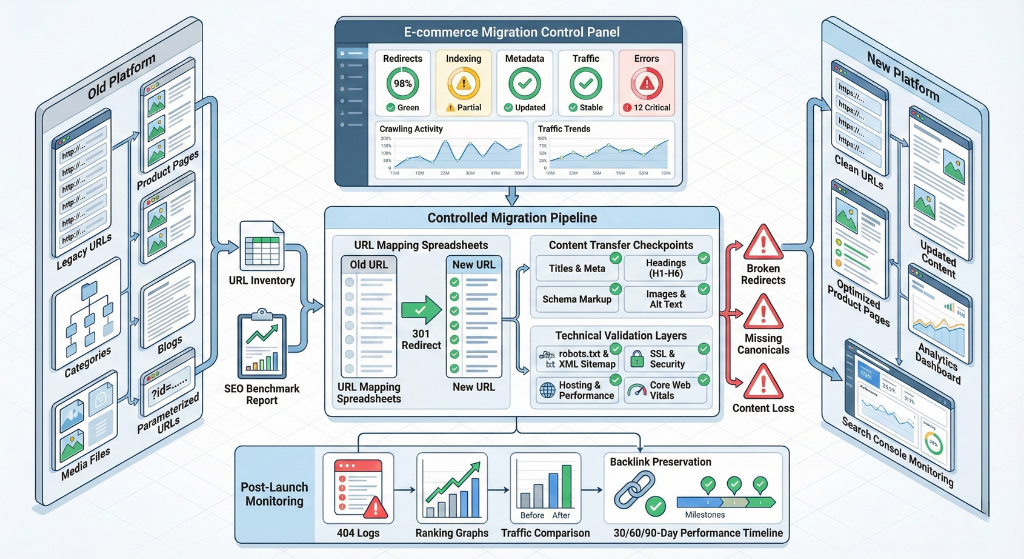
Most ecommerce migrations do not fail because of bad planning. They fail because the plan did not account for SEO.
A store switches from Magento to Shopify, or from WooCommerce to a SaaS platform, and six weeks after launch organic traffic is down 40%. Rankings that took years to build disappear. Revenue from search drops to a trickle. By the time anyone figures out what happened, hundreds of redirect errors, broken canonicals, and lost metadata have already been crawled and cached by Google.
This checklist covers every step of an ecommerce platform migration, with a dedicated section on protecting and improving your SEO through the move. Whether you are migrating to Shopify, switching from Magento, consolidating multiple stores, or moving from a custom platform to a SaaS solution, the framework below applies.
Work through it in order. Skip a step and you will find it again — on the other side of a traffic drop.
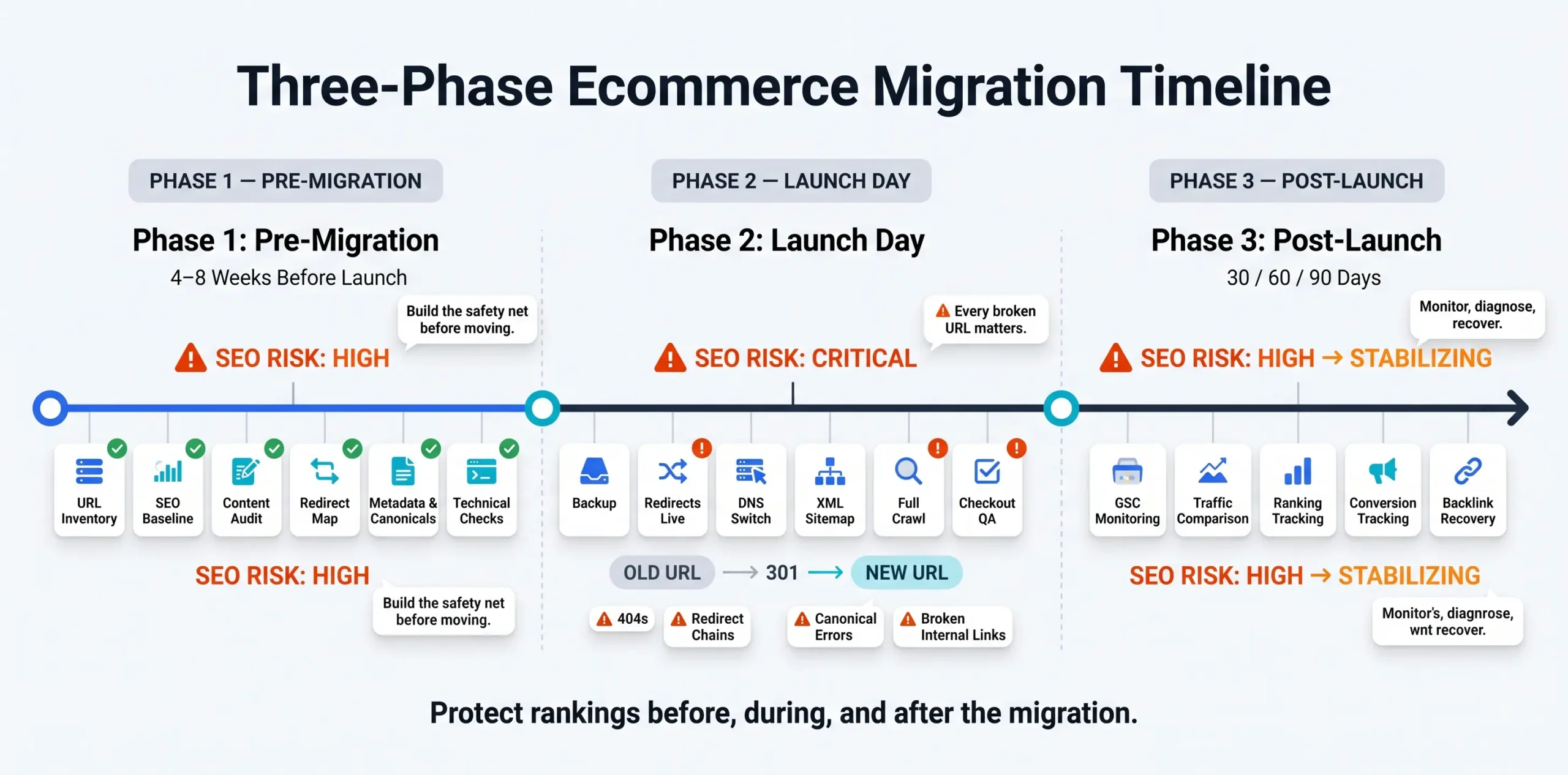
Phase 1: Pre-Migration (Start 4–8 Weeks Before Launch)
Step 1: Build Your URL Inventory
Export every URL on the existing site before anything else moves. This is your source of truth for the entire migration.
The list should include:
- All product pages
- All category and collection pages
- All blog posts and informational content
- All static pages (about, contact, policy pages)
- Media file URLs (images, PDFs, downloadable assets)
- Parameterized URLs created by filters, sorting, and search
- Legacy URLs still receiving backlinks or organic traffic
For each URL, record the current traffic, ranking keywords, and inbound backlinks. Pages with backlinks from external sites are your highest-priority redirect targets. Losing those without a 301 redirect means losing the link equity they carry.
Tool options: Screaming Frog, Sitebulb, or a GSC export filtered by page.
Step 2: Capture Your SEO Baseline
Before you move anything, document where you are. You need a before-and-after comparison, and you cannot build an after without a before.
Record:
- Organic traffic by landing page (last 3–6 months from GA4)
- Current keyword rankings for your top 50–100 terms
- Top-performing pages by clicks and impressions (GSC)
- Backlink profile: total referring domains, top linking pages
- Core Web Vitals scores for your main templates (homepage, PDP, PLP)
- Current conversion rate and revenue from organic traffic
This baseline becomes your migration report card at 30, 60, and 90 days post-launch.
Step 3: Audit and Decide What Moves, What Improves, What Goes
Migration is a content reset opportunity. Not everything on the old site deserves to carry over in its current state.
For each section of the site, decide:
- Keep as-is: content that is performing and does not need changes
- Migrate and improve: content that is indexable but thin, outdated, or under-optimized
- Consolidate: multiple pages that target the same intent should merge into one, with redirects from the retired URLs
- Retire: pages with zero traffic, no backlinks, and no strategic value (redirect to the closest semantic match, not the homepage)
Retiring pages without a redirect is one of the most common causes of post-migration ranking loss. Even low-value pages sometimes carry link equity from a single external reference.
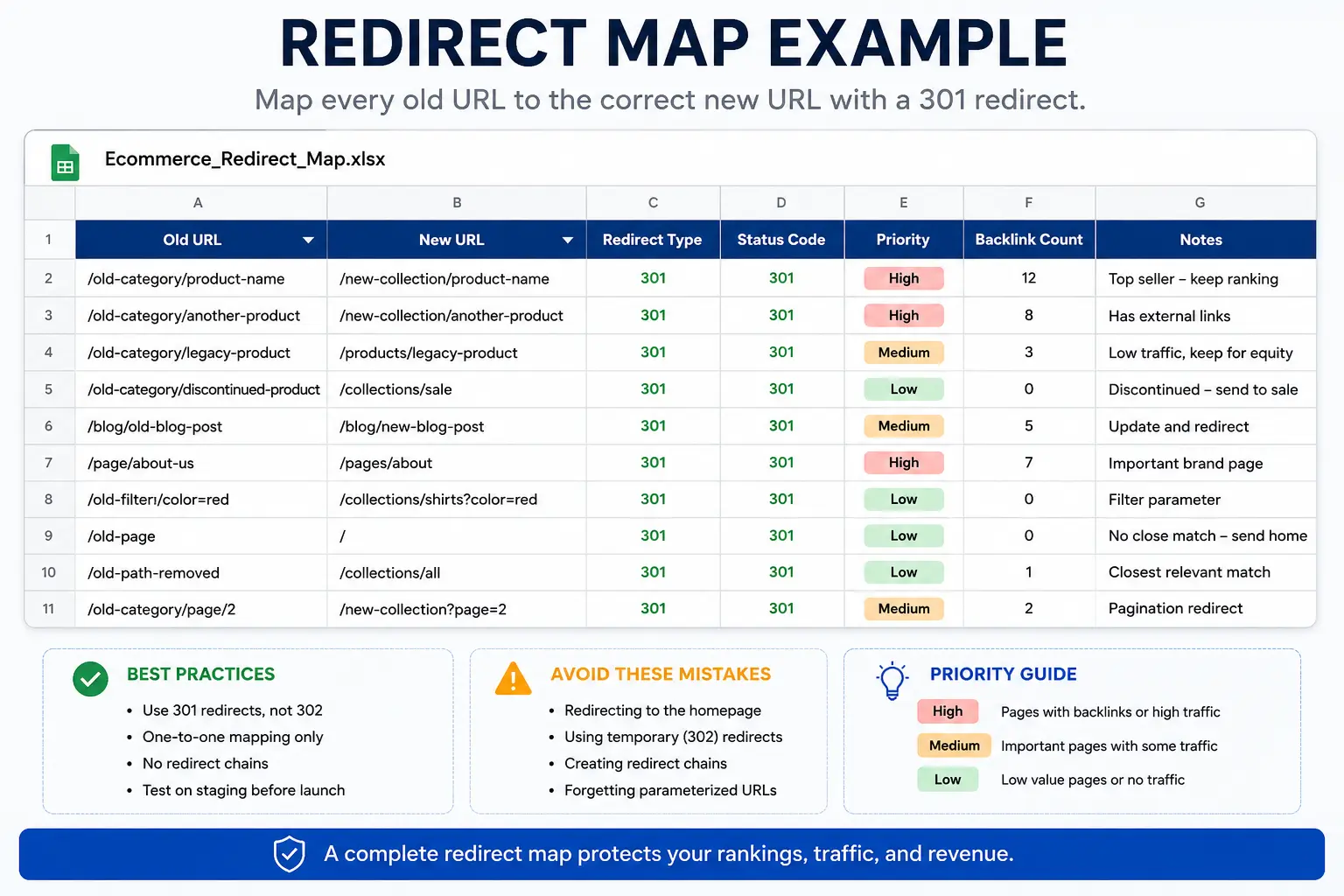
Step 4: Build the Redirect Map
This is the most operationally critical document in the entire migration. Every URL that changes needs a row.
The redirect map should have:
| Old URL | New URL | Redirect Type | Priority | Notes |
|---|---|---|---|---|
| /old-category/product-name | /new-collection/product-name | 301 | High | Has 12 backlinks |
Rules that must hold:
- Use 301 redirects, not 302. Temporary redirects do not pass link equity.
- One-to-one mapping only. Never redirect a product page to the homepage.
- No redirect chains. Old → New should be direct. Old → Temp → New passes less equity and creates crawl overhead.
- Special URL types need their own rows: filter pages, pagination, sort parameters, legacy paths that still appear in backlink profiles.
Validate the redirect map on staging before it touches production.
Step 5: Transfer On-Page SEO Signals
When content moves to a new platform, the metadata does not migrate automatically. You have to bring it with you.
For every migrated page, verify:
- Title tag matches or improves on the original
- Meta description is present and accurate
- H1 is preserved and reflects the primary keyword
- H2/H3 structure carries over correctly
- Image alt text transfers with the media files
- Canonical tags point to the correct new URLs, not old ones
- Schema markup (product, breadcrumbs, review, organization) is rebuilt on the new platform
If the new platform uses different URL structures, ensure canonicals are updated to match. A canonical pointing to an old URL after migration creates a duplication problem that can suppress rankings for weeks.
Step 6: Technical Infrastructure Checks
Before go-live, the new environment needs to be verified against a technical baseline:
- SSL certificate is installed and HTTPS is enforced across all pages
- Hosting environment has adequate speed and uptime guarantees
- CDN is configured for images and static assets
- Robots.txt does not accidentally block crawl access to important sections
- A new XML sitemap has been generated reflecting the new URL structure
- Mobile responsiveness is confirmed across all key templates
- Core Web Vitals are tested on staging for homepage, product page, and category page templates
A slow new platform will lose rankings even if every redirect is perfect. Core Web Vitals are a ranking signal. Confirm them before launch, not after.
Phase 2: Launch Day Execution
Step 7: Protect the Migration Window
Do not launch during your highest-traffic period. Schedule the cutover during your lowest-traffic window, typically mid-week overnight.
Before cutting over:
- Take a full backup of the old site (files, database, media)
- Lower DNS TTL to 300 seconds (5 minutes) 24–48 hours before launch to allow fast propagation
- Confirm the staging environment has passed all QA checks
- Assign a point person for each task area: redirects, analytics, development, SEO
Step 8: Deploy in Order
Once the new site goes live:
- Deploy redirects first, before anything else
- Point DNS to the new hosting environment
- Submit the new XML sitemap to Google Search Console and Bing Webmaster Tools immediately
- Run a full crawl of the new site within the first hour using Screaming Frog or a similar crawler
The crawl should surface:
- 404 errors (URLs that did not get a redirect)
- Redirect chains or loops
- Canonical mismatches
- Missing metadata
- Broken internal links
- Images returning errors
Fix critical errors within the first 24 hours. Every hour a broken URL sits without a redirect is a potential ranking signal being sent to Google.
Step 9: Validate Revenue-Critical Paths
SEO is only one concern. Validate these before declaring the launch complete:
- Checkout flow (add to cart → payment → confirmation)
- Account creation and login
- Search functionality
- Discount codes and promotional pricing
- Order confirmation and transactional emails
- Integrations: inventory systems, CRMs, shipping platforms, review tools
A migration that works for SEO but breaks checkout is still a business disaster.
Phase 3: Post-Migration Monitoring (30/60/90 Days)
Step 10: Watch GSC for the First 30 Days
Google Search Console will surface migration problems faster than rankings will. Within the first two weeks, monitor:
- Coverage report: any new “Excluded” URLs that should be indexed
- Crawl errors: 404s and server errors that crawlers are hitting
- Soft 404s: pages returning a 200 status code but with thin or missing content
- Redirect anomalies: URLs being redirected to unexpected destinations
- Sitemap indexing: confirm the new sitemap is being processed
A spike in crawl errors after launch is a signal, not a diagnosis. Use it to trace back to the specific URLs and fix the root cause in the redirect map.
Step 11: Compare Traffic at 30, 60, and 90 Days
Pull the baseline report you built in Step 2 and compare it against post-launch performance at each milestone.
What to track:
- Organic traffic (total and by landing page)
- Keyword rankings for your top terms
- Conversion rate from organic traffic
- Revenue from organic traffic
A post-migration dip of 5–15% in the first two weeks is common while Google re-crawls and re-evaluates the site. Drops beyond that, or drops that continue past week 3, indicate a structural problem: missed redirects, canonical errors, or a technical block.
Step 12: Rebuild Backlinks That Pointed to Old URLs
Not every backlink gets the benefit of a 301 redirect. Some domains cache old URLs for months. Some editorial links get broken before your redirect is in place.
After launch:
- Run a backlink audit against the old domain
- Identify external links still pointing to old URLs that now redirect (good) vs. broken links (needs outreach)
- Contact site owners for high-value editorial links and request an update to the new URL
- Submit corrected URLs to major directories you control (Google Business Profile, industry listings, partner sites)
This is the step most migrations skip. It is also the step that explains why some sites take 90+ days to fully recover their organic performance even after a technically clean migration.
Ecommerce Platform Migration SEO: The Three Rules That Override Everything Else
Even if you execute every step above, three principles determine whether the migration holds its rankings.
Rule 1: Redirect equity, not just URLs. A redirect map that sends traffic is not the same as a redirect map that sends link equity. Confirm that 301 redirects are returning the correct status code in a crawler before launch. A 302 masquerading as a 301 will quietly drain equity from every redirected page.
Rule 2: Preserve crawl paths. Internal links are how Google discovers and weights pages. If the new platform rebuilds navigation in a way that buries formerly high-priority pages (e.g., product categories previously linked from the homepage now require three clicks), those pages will lose ranking weight even if the content is identical.
Rule 3: Do not consolidate during migration. Merging pages, restructuring taxonomies, and updating content are worthwhile SEO activities. Doing them at the same time as a platform migration makes it impossible to diagnose what caused any post-migration drop. Migrate first. Optimize after the site is stable.
Frequently Asked Questions
How long does it take to recover rankings after an ecommerce platform migration?
For a clean migration with complete redirect coverage, most sites see rankings stabilize within 4–8 weeks. Pages that had strong backlinks and tight semantic focus tend to recover fastest. Pages that were borderline performers before migration may not recover fully, which is not a migration failure — it is the baseline reality clarified.
Should I migrate all products at once or in phases?
Phased migration reduces risk but significantly increases operational complexity. Redirect logic, crawl behavior, and analytics tracking all become harder to manage when half the site is on one platform and half is on another. For most stores, a full cutover with a solid redirect map is safer than a phased approach that drags on for months.
Do redirects lose SEO value?
A properly implemented 301 redirect passes the vast majority of link equity to the destination URL. The idea that redirects cause major link equity loss comes from outdated Google documentation. The practical risk is not the redirect itself — it is redirect chains, incorrect redirect types (302 vs 301), or redirects that loop back to the old URL.
What happens to my Google Shopping feed and product schema during migration?
Your product feed in Google Merchant Center will need to be updated with new URLs if they change. Product schema on the new platform should be re-implemented and validated using Google’s Rich Results Test. Neither transfers automatically.
Can I migrate and change my URL structure at the same time?
Yes, but map every change explicitly. If you are flattening a three-level category hierarchy or removing /collections/ from product paths, every old URL needs its own redirect to the new destination. Do not use wildcard redirects for URL restructuring unless you have tested every pattern for false positives.
What is the biggest mistake ecommerce stores make during a platform migration?
Redirecting pages to the homepage. It seems like a safe fallback, but it tells Google that the old pages no longer exist as distinct entities. Any link equity they carried goes to the homepage, which rarely needs it. Any rankings those pages had disappear. Always redirect to the closest semantic match — the same product on the new platform, the equivalent category, or the parent section.
Should I notify Google when I migrate?
Submit the new sitemap to Google Search Console the day of launch. There is no formal migration notification tool, but submitting the sitemap triggers a fresh crawl of the new URL set. If you are changing domains (not just platforms), the Domain Change tool in GSC can accelerate the transition.
How do I know if my redirect map is complete?
Run a crawl of the old site immediately before migration to capture the final URL list. Then run a crawl of the live site the day after launch and compare. Any old URL returning a 404 on the new site is a redirect gap. Do not rely on the redirect map document alone — always verify with a live crawl.
Moving Platforms Is a Growth Decision. Losing Rankings Is Not.
A platform migration done right is one of the highest-leverage technical investments an ecommerce store can make. It cleans up years of technical debt, improves site performance, and opens capabilities that the old platform never supported.
Done wrong, it hands your organic traffic to competitors who did not move at all.
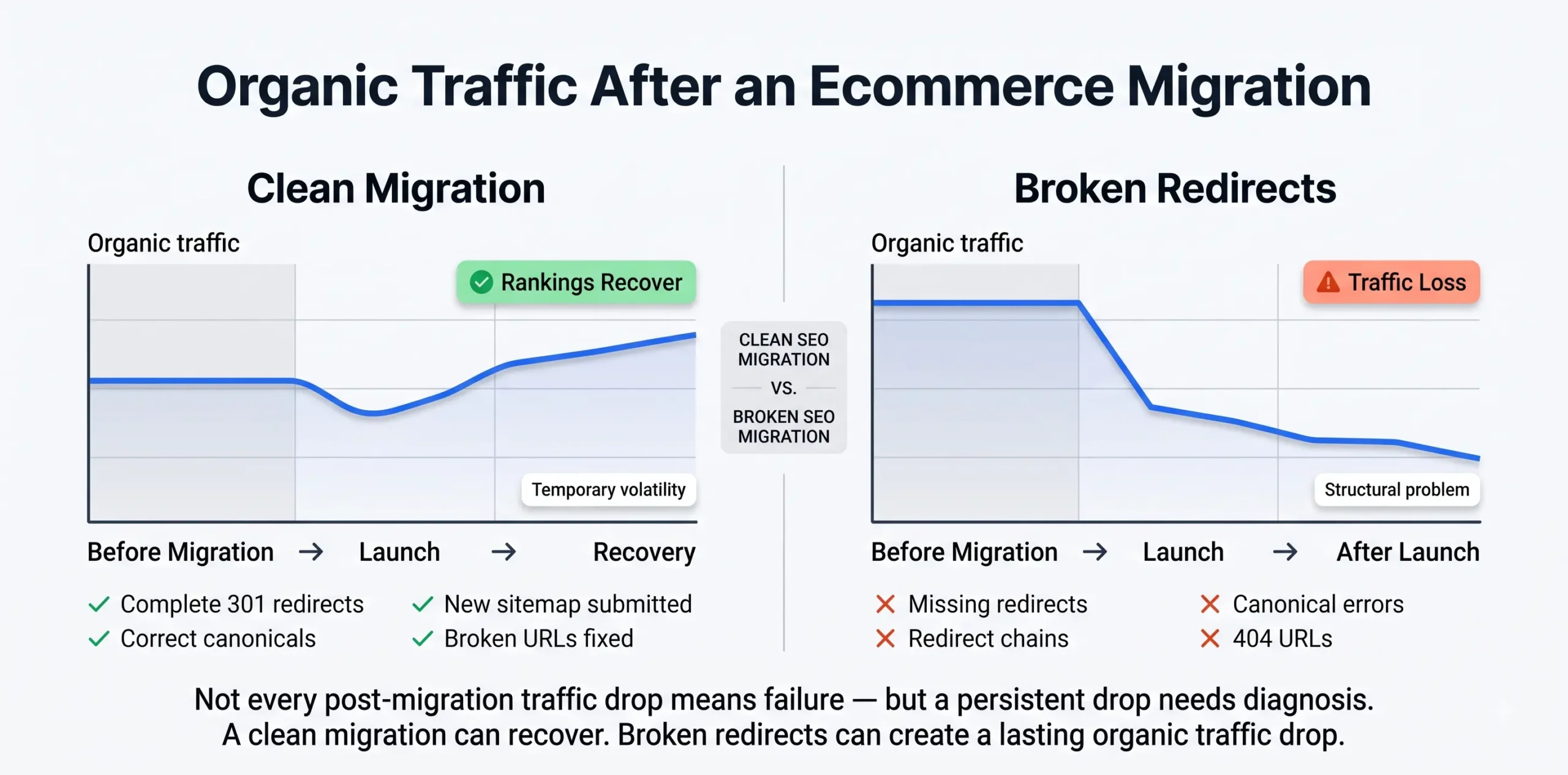
The difference between the two is planning, a complete redirect map, and someone who understands that SEO does not transfer automatically — it has to be rebuilt, step by step, in exactly the right order.
At CGColors, we manage ecommerce migrations from the redirect map to the 90-day post-launch audit. If you are planning a platform switch and need to know what it takes to protect your rankings through the move, we will walk you through it. Found first, called first, booked first.
Plan Your Migration with CGColors