
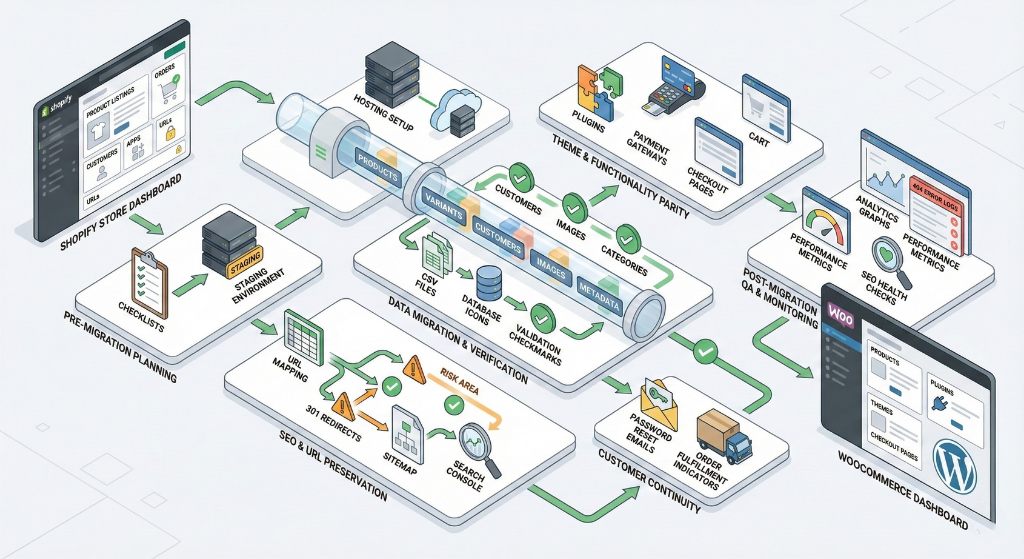
E-commerce Platform Migration Checklist to Avoid SEO & Operational Disasters
Migrating from Shopify to WooCommerce offers flexibility, control, and long-term cost advantages but only when executed with structured planning, precise data handling, and flawless SEO continuity. The framework below provides a comprehensive migration audit covering pre-migration planning, data integrity, URL/SEO preservation, operational continuity, and post-launch validation.
1. Pre-Migration Planning
Migration success depends on clarity of intent, proper resources, and a structured environment.
Strategic Assessment
- Identify the primary reasons for migrating (cost reduction, customization, ownership, integrations, checkout control, SEO flexibility).
- Assess store size and complexity: number of products, variants, SKUs, custom fields, metafields, orders, customer records, installed apps, third-party integrations.
- Confirm access to all Shopify data exports:
- Products + variants
- Collection/category metadata
- Customers
- Order history
- Discounts
- Tax/shipping settings
- Theme files (reference only)
- Image assets
Infrastructure & Environment
- Select suitable WooCommerce hosting (high-performance WordPress hosting with PHP optimization, database capacity, automatic backups, and SSL).
- Confirm you can manage ongoing maintenance: plugin updates, theme updates, WordPress security, backup schedules, and server monitoring.
- Document plugins needed to replicate Shopify functionality (filters, subscriptions, multi-currency, wishlist, reviews, etc.).
- Define your staging environment for test migrations.
Operational Output: a complete pre-migration strategy document + hosting readiness checklist.
2. Data Migration Questions
Data accuracy determines customer trust, operational continuity, and SEO stability.
Export & Transform Requirements
- Validate that all product data and variants can be exported: SKUs, pricing, stock, descriptions, metafields, categories/collections, tags, and all image URLs.
- Confirm how Shopify metafields will map to WooCommerce custom fields or plugins.
- Identify which Shopify data cannot be migrated directly:
- Customer passwords (users must reset passwords after migration).
- Certain app data or proprietary configuration fields.
Order & Customer Data
- Determine how much order history can migrate and what limitations exist (gateway tokens, partial refunds, some financial data).
- Validate that discount codes, shipping rules, and tax settings will import correctly or document manual recreation steps.
Testing Process
- Perform a full test migration on a staging site.
- Validate data integrity across:
- Product variants
- SKU structure
- Images mapped correctly
- Category and tag hierarchies
- Customer details
- Order records (accurate dates, totals, statuses)
Operational Output: data verification report with mismatches, missing fields, and reconciliation steps.
3. SEO & URL Management
SEO risk is the #1 migration failure point. URL mismatches and missing redirects cause catastrophic ranking losses.
URL Structure Planning
- Compare Shopify URL formats (/products/, /collections/, /pages/) with WooCommerce format (/product/, /product-category/, custom slugs).
- Prepare a complete URL mapping spreadsheet:
- Old Shopify URL → New WooCommerce URL
- One-to-one mapping required for every product, category, blog, and page.
Redirects & Reindexing
- Implement 301 redirects for all old URLs to new URLs (no exceptions).
- Validate redirect functionality across staging and production.
- Submit updated XML sitemap to Google Search Console post-migration.
- Monitor for indexing errors, coverage warnings, or URL removal notifications.
- Track 404 logs daily for the first 30–90 days.
Operational Output: redirect map + updated sitemap + 404 monitoring dashboard.
4. Functionality & Theme
Shopify features are app-driven; WooCommerce requires plugins and theme compatibility.
Functionality Replication
- Confirm WooCommerce plugins exist to replicate Shopify functionality:
- Filters and faceted search
- Multi-currency / multilingual
- Subscriptions
- Product recommendations
- Abandoned cart recovery
- Advanced shipping rules
- Validate theme-selection based on speed, responsiveness, and plugin compatibility.
Performance & QA
- Test for plugin conflicts and ensure PHP version compatibility.
- Ensure mobile optimization of all templates (product pages, cart, checkout).
- Validate checkout workflows, payment gateways, tax rules, and shipping rules.
- Confirm transactional emails (order confirmation, shipping, password reset) are configured and styled.
Operational Output: functional parity report + theme and plugin QA checklist.
5. Customer & Operational Continuity
Migration must not disrupt customers, orders, or backend operations.
Customer Impact
- Customer passwords cannot be migrated; prepare a password reset communication plan.
- For pending orders pre-migration, decide whether to fulfill on Shopify or recreate in WooCommerce.
- Prepare customer communication regarding upcoming changes or downtime.
Integrations & Operations
- Confirm CRM, ESP (email marketing), analytics, warehouse, and ERP integrations support WooCommerce.
- Validate API connections and webhook behavior.
- Ensure customer notifications, tracking emails, and automated flows continue post-migration.
Operational Output: continuity plan covering passwords, communications, and integration handover.
6. Post-Migration Audit
Post-launch checks catch issues before they affect customers or search engines.
Product & Data Verification
- Audit all products, variants, images, pricing, stock levels, categories, and metadata.
- Validate product schema (structured data) is present and accurate.
SEO Audit
- Validate:
- Meta titles and descriptions
- Canonical tags
- Schema markup
- Redirects (301s triggering correctly)
- Open Graph tags
- Sitemap indexing
- Check speed optimization, SSL, caching, and plugin performance.
- Review logs for 404s, broken links, missing images, or incorrect URLs.
Analytics & Sales Monitoring
- Monitor user behavior (bounce rate, session duration, conversion rate).
- Track sales performance and funnel metrics.
- Validate checkout completion, payment success, and abandoned-cart tracking.
Contingency
- Prepare rollback plan or partial reversion workflow if critical issues occur.
Operational Output: post-migration QA report + SEO audit + performance baseline.
7. Risk & Tradeoff Awareness
Shopify → WooCommerce migration introduces new responsibilities.
Risk Awareness
- Migration requires significant time, technical experience, and QA resources.
- Some Shopify features or app functionalities may not have exact WooCommerce equivalents.
- WooCommerce requires ongoing security, plugin updates, hosting maintenance, performance tuning.
- WooCommerce offers more flexibility and long-term cost advantages, but demands operational discipline.
Operational Output: risk mitigation plan + required resource list.
8. Practical Checklist Questions
Final Pre-Launch Checklist
- Full Shopify backup completed (products, customers, orders, themes, files).
- WooCommerce staging site set up and tested.
- Migration plugin/tool selected (or manual CSV process prepared).
- Full URL mapping and 301 redirect plan completed.
- Post-migration QA checklist prepared:
- Products
- Orders
- Checkout + payments
- Mobile performance
- Analytics and conversion tracking
- Customer communication prepared for password resets or downtime.
Post-Launch Monitoring
- SEO and traffic monitored daily for 30–90 days.
- 404 logs reviewed and redirect gaps patched.
- Sales funnel performance compared to Shopify baselines.
- Plugin, theme, and server health monitored regularly.
Operational Output: master migration checklist + monitoring calendar.