
https://cgcolors.com/wp-content/cache/breeze-minification/js/breeze_blog-how-to-set-up-facebook-pixel-for-your-small-b-1-15311-inline_script_1.js?ver=1769620754
https://cgcolors.com/wp-content/cache/breeze-minification/js/breeze_blog-how-to-set-up-facebook-pixel-for-your-small-b-1-15311-inline_script_2.js?ver=1769620754
https://cgcolors.com/wp-content/cache/breeze-minification/js/breeze_blog-how-to-set-up-facebook-pixel-for-your-small-b-1-15311-inline_script_3.js?ver=1769620754
https://cgcolors.com/wp-content/cache/breeze-minification/js/breeze_blog-how-to-set-up-facebook-pixel-for-your-small-b-1-15311-inline_script_4.js?ver=1769620754
https://cgcolors.com/wp-content/cache/breeze-minification/js/breeze_blog-how-to-set-up-facebook-pixel-for-your-small-b-1-15311-inline_script_5.js?ver=1769620754
https://cgcolors.com/wp-content/cache/breeze-minification/js/breeze_blog-how-to-set-up-facebook-pixel-for-your-small-b-1-15311-js-js-front-end-breeze-prefetch-links.min.js?ver=1769620754
https://cgcolors.com/wp-content/cache/breeze-minification/js/breeze_blog-how-to-set-up-facebook-pixel-for-your-small-b-1-15311-cleantalk-spam-protect-js-apbct-public-bundle.min.js?ver=1769620754
https://cgcolors.com/wp-content/cache/breeze-minification/js/breeze_blog-how-to-set-up-facebook-pixel-for-your-small-b-1-15311-js-jquery-jquery.min.js?ver=1769620754
https://cgcolors.com/wp-content/cache/breeze-minification/js/breeze_blog-how-to-set-up-facebook-pixel-for-your-small-b-1-15311-js-jquery-jquery-migrate.min.js?ver=1769620754
https://cgcolors.com/wp-content/cache/breeze-minification/js/breeze_blog-how-to-set-up-facebook-pixel-for-your-small-b-1-15311-inline_script_6.js?ver=1769620754
https://cgcolors.com/wp-content/cache/breeze-minification/js/breeze_blog-how-to-set-up-facebook-pixel-for-your-small-b-1-15311-inline_script_7.js?ver=1769620754
https://cgcolors.com/wp-content/cache/breeze-minification/js/breeze_blog-how-to-set-up-facebook-pixel-for-your-small-b-1-15311-inline_script_8.js?ver=1769620754
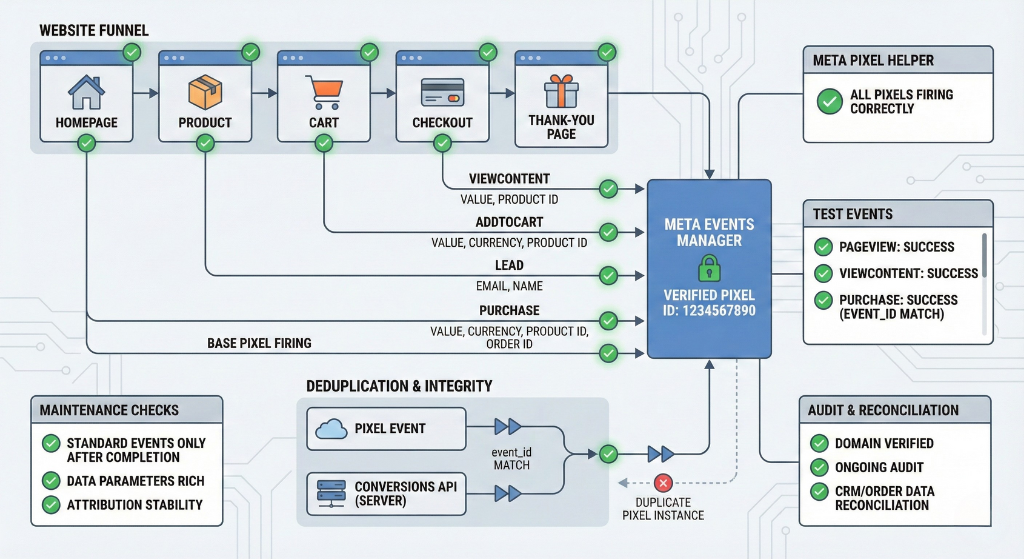
How to Set Up Facebook Pixel for Your Small Business Website (Step-by-Step Implementation Framework) Accurate Facebook Pixel implementation is foundational for conversion tracking, retargeting, and Meta Ads optimization. Small businesses frequently face performance issues not because of weak campaigns, but because core tracking elements are misconfigured or incomplete. The following framework outlines the operational checks required to ensure a correct, stable, and scalable Pixel setup.
1. Pixel Setup & Installation: Foundational Integrity A Pixel setup is only functional when the ID, placement, and deployment flow are configured precisely. Several failure points are common during installation.
Common Setup Issues Incorrect Pixel creation or ID mismatch
Pixel created in the wrong Business Manager.
Pixel ID in site code does not match the ID inside Meta Events Manager.
Incomplete base-pixel installation
Pixel added only to the homepage or a handful of pages.
Missing installation on critical funnel assets: product pages, cart, checkout, confirmation pages.
Improper GTM deployment
Pixel fired from Google Tag Manager while another hard-coded instance is still active.
Incorrect trigger settings (e.g., no All Page Views trigger).
Pixel firing only on some templates due to misconfigured rules.
Duplicate integrations
Pixel added manually in theme code + added again through plugins/native integrations.
E-commerce plugins automatically inserting another Pixel instance without detection.
Domain configuration issues
Domain not verified or mismatched (www vs non-www, http vs https).
Unverified domains prevent correct attribution and event prioritization.
How to Prevent Setup Errors Confirm Pixel ID consistency between Meta Business Manager and website implementation.
Install base Pixel code on every public-facing and funnel-critical page.
Deploy Pixel via a single method (GTM or native), not multiple.
Validate that only one Pixel instance fires per page.
Configure and verify domain inside Meta to ensure tracking recognition.
2. Event Configuration & Correctness: Tracking the Right User Actions The Pixel is only useful if events reflect real business actions. Misconfigured events lead to incorrect reporting, poor optimization, and wasted budget.
Common Event Issues Incorrect or placeholder events
Using generic events (e.g., ViewContent) instead of real business actions (Lead, Purchase, AddToCart).
Incorrect event placement
Firing Lead on page load instead of after form submission.
Firing Purchase before checkout completion.
Missing event parameters
No value or currency included for Purchase.
Missing product identifiers (content_ids).
Missing event_name consistency for optimization.
Malformed custom events
Parameter names not matching Meta’s requirements.
Data types incorrect or inconsistent across pages.
CAPI deduplication errors
Browser and server events sent without matching event_id.
Duplicate conversions counted or dropped due to mismatch.
How to Ensure Correct Event Tracking Map each business action to the correct Meta standard event.
Trigger conversion events post-completion, not on intermediate actions.
Provide Meta with required parameters (value, currency, product IDs).
Validate naming conventions for custom events.
Configure deduplication when using both Pixel and Conversions API.
3. Testing & Verification: Confirming Pixel Functionality Installation does not guarantee functionality. Verification is mandatory.
Core Testing Requirements Use Meta Pixel Helper
Confirm PageView and event firing across homepage, product pages, cart, checkout, and thank-you pages.
Identify warnings, missing parameters, or duplicate firings.
Use Meta Test Events
Simulate full funnel flows:
View product
Add to Cart
Checkout
Purchase / Lead submission
Confirm real-time event visibility.
Cross-browser testing
Check across Chrome, Safari, Firefox, mobile browsers, and incognito.
Validate behavior with/without ad blockers.
Redirect and third-party checkout flows
Verify Pixel firing after external gateways (PayPal, Razorpay, Stripe-hosted pages).
Ensure cookie and parameter values persist through redirects.
Post-update validation
Re-test all events after theme updates, plugin updates, code deployments, or checkout changes.
How to Maintain Testing Accuracy Establish a standard QA checklist for Pixel validation.
Perform a complete funnel test after any update or deployment.
Document baseline expected events and parameters.
4. Data Integrity & Attribution: Ensuring Clean, Reliable Signals Accurate optimization requires clean, deduplicated, parameter-rich event data.
Common Data Integrity Issues Duplicate Pixel firing
Multiple Pixel instances due to overlapping integrations.
Double Purchase or double Lead conversions.
Incorrect event values
Missing or zero purchase value.
Wrong currency codes.
Incorrect product IDs not matching catalog feed.
CAPI + Pixel mismatch
Missing event_id alignment leading to double-counting or dropped conversions.
Low Event Matching Quality
Missing parameters (email, phone, browser data).
Poor match rate reduces optimization capabilities.
Low-quality or irrelevant conversion events
Using non-meaningful interactions (scroll, view) as primary conversions.
Inflated performance reports due to micro-events.
Internal traffic pollution
Admin or developer traffic counted as conversions.
Test transactions inflating conversion value.
Ensuring Data Accuracy Maintain a single, authoritative Pixel installation.
Validate event parameters regularly.
Segment primary vs. secondary events.
Exclude staff/admin IPs or traffic patterns.
Monitor Event Matching Quality in Events Manager.
5. Ongoing Monitoring, Maintenance & Stability Controls Pixel tracking is not static. Stability requires recurring audits and consistency.
Key Maintenance Requirements Periodic audits
Monthly review of Pixel integrity, event flow, parameters, and duplicates.
Re-testing after updates
Full funnel tests after theme or plugin changes.
Server-side tracking checks
Monitor CAPI reliability and fallback mechanisms.
Ensure deduplication remains stable across releases.
Business data reconciliation
Compare Meta conversion totals with actual CRM or order data.
Identify under-reporting (Pixel not firing) or over-reporting (duplicate events).
Rapid anomaly investigation
Drops or spikes in conversions should trigger immediate diagnostic checks:
Pixel firing behavior
Event parameters
Checkout conditions
Redirect changes
CAPI health
Maintaining Stability Use monitoring dashboards for event diagnostics.
Document responsible parties and processes for tracking.
Build a controlled change-management workflow.
6. Common Failure Modes & Edge Cases Several issues frequently surface in community forums and audits.
Blocked JavaScript or cookies
Ad-blockers, ITP (Safari), cookie consent popups blocking Pixel firing.
Platform or theme migration
Pixel integrations break after CMS change, theme swap, checkout upgrades.
External payment gateways
Pixel not firing on confirmation pages delivered by third-party systems.
Duplicate installations
Plugin + manual + tag manager all active simultaneously.
Reload-triggered duplicates
Purchases firing again on page refresh.
Catalog mismatch
Product IDs not syncing with Meta catalog, breaking dynamic ads.
7. Strategic Tracking Considerations Beyond installation, tracking architecture must support long-term optimization.
Strategic Requirements Robust tracking ecosystem
Pixel + CAPI with deduplication ensures data resilience.
Privacy limitation mitigation
Prepare for cookie restrictions, browser limitations, and regulatory changes.
Use server-side tracking as fallback.
Documented tracking policies
Clear definitions of:
Primary conversion
Secondary events
Deduplication logic
Test event protocols
Internal traffic exclusions
Why This Matters A structured tracking framework improves:
Retargeting accuracy
Lookalike audience quality
Value-based bidding performance
Attribution reliability
https://cgcolors.com/wp-content/cache/breeze-minification/js/breeze_blog-how-to-set-up-facebook-pixel-for-your-small-b-1-15311-assets-js-jquery-1.9.1.min.js?ver=1769620754
https://cgcolors.com/wp-content/cache/breeze-minification/js/breeze_blog-how-to-set-up-facebook-pixel-for-your-small-b-1-15311-assets-js-bootstrap.js?ver=1769620754
https://cgcolors.com/wp-content/cache/breeze-minification/js/breeze_blog-how-to-set-up-facebook-pixel-for-your-small-b-1-15311-assets-js-owl.carousel.min.js?ver=1769620754
https://cgcolors.com/wp-content/cache/breeze-minification/js/breeze_blog-how-to-set-up-facebook-pixel-for-your-small-b-1-15311-assets-js-easyResponsiveTabs.js?ver=1769620754
https://cgcolors.com/wp-content/cache/breeze-minification/js/breeze_blog-how-to-set-up-facebook-pixel-for-your-small-b-1-15311-assets-js-BigPicture.js?ver=1769620754
https://cgcolors.com/wp-content/cache/breeze-minification/js/breeze_blog-how-to-set-up-facebook-pixel-for-your-small-b-1-15311-inline_script_9.js?ver=1769620754
https://cgcolors.com/wp-content/cache/breeze-minification/js/breeze_blog-how-to-set-up-facebook-pixel-for-your-small-b-1-15311-inline_script_10.js?ver=1769620754
https://cgcolors.com/wp-content/cache/breeze-minification/js/breeze_blog-how-to-set-up-facebook-pixel-for-your-small-b-1-15311-inline_script_11.js?ver=1769620754
https://cgcolors.com/wp-content/cache/breeze-minification/js/breeze_blog-how-to-set-up-facebook-pixel-for-your-small-b-1-15311-inline_script_12.js?ver=1769620754
https://cgcolors.com/wp-content/cache/breeze-minification/js/breeze_blog-how-to-set-up-facebook-pixel-for-your-small-b-1-15311-inline_script_13.js?ver=1769620754
https://cgcolors.com/wp-content/cache/breeze-minification/js/breeze_blog-how-to-set-up-facebook-pixel-for-your-small-b-1-15311-inline_script_14.js?ver=1769620754
https://cgcolors.com/wp-content/cache/breeze-minification/js/breeze_blog-how-to-set-up-facebook-pixel-for-your-small-b-1-15311-inline_script_15.js?ver=1769620754
https://cgcolors.com/wp-content/cache/breeze-minification/js/breeze_blog-how-to-set-up-facebook-pixel-for-your-small-b-1-15311-inline_script_16.js?ver=1769620754
https://cgcolors.com/wp-content/cache/breeze-minification/js/breeze_blog-how-to-set-up-facebook-pixel-for-your-small-b-1-15311-js-dist-hooks.min.js?ver=1769620754
https://cgcolors.com/wp-content/cache/breeze-minification/js/breeze_blog-how-to-set-up-facebook-pixel-for-your-small-b-1-15311-js-dist-i18n.min.js?ver=1769620754
https://cgcolors.com/wp-content/cache/breeze-minification/js/breeze_blog-how-to-set-up-facebook-pixel-for-your-small-b-1-15311-inline_script_17.js?ver=1769620754
https://cgcolors.com/wp-content/cache/breeze-minification/js/breeze_blog-how-to-set-up-facebook-pixel-for-your-small-b-1-15311-swv-js-index.js?ver=1769620754
https://cgcolors.com/wp-content/cache/breeze-minification/js/breeze_blog-how-to-set-up-facebook-pixel-for-your-small-b-1-15311-inline_script_18.js?ver=1769620754
https://cgcolors.com/wp-content/cache/breeze-minification/js/breeze_blog-how-to-set-up-facebook-pixel-for-your-small-b-1-15311-includes-js-index.js?ver=1769620754
https://cgcolors.com/wp-content/cache/breeze-minification/js/breeze_blog-how-to-set-up-facebook-pixel-for-your-small-b-1-15311-inline_script_19.js?ver=1769620754
https://cgcolors.com/wp-content/cache/breeze-minification/js/breeze_blog-how-to-set-up-facebook-pixel-for-your-small-b-1-15311-build-assets-frontend-script.js?ver=1769620754
https://cgcolors.com/wp-content/cache/breeze-minification/js/breeze_blog-how-to-set-up-facebook-pixel-for-your-small-b-1-15311-inline_script_20.js?ver=1769620754
https://cgcolors.com/wp-content/cache/breeze-minification/js/breeze_blog-how-to-set-up-facebook-pixel-for-your-small-b-1-15311-assets-js-skip-link-focus-fix.js?ver=1769620754
https://cgcolors.com/wp-content/cache/breeze-minification/js/breeze_blog-how-to-set-up-facebook-pixel-for-your-small-b-1-15311-assets-js-navigation.js?ver=1769620754
https://cgcolors.com/wp-content/cache/breeze-minification/js/breeze_blog-how-to-set-up-facebook-pixel-for-your-small-b-1-15311-assets-js-global.js?ver=1769620754
https://cgcolors.com/wp-content/cache/breeze-minification/js/breeze_blog-how-to-set-up-facebook-pixel-for-your-small-b-1-15311-assets-js-jquery.scrollTo.js?ver=1769620754
https://cgcolors.com/wp-content/cache/breeze-minification/js/breeze_blog-how-to-set-up-facebook-pixel-for-your-small-b-1-15311-wp-includes-js-comment-reply.min.js?ver=1769620754
https://cgcolors.com/wp-content/cache/breeze-minification/js/breeze_blog-how-to-set-up-facebook-pixel-for-your-small-b-1-15311-assets-js-webpack.runtime.min.js?ver=1769620754
https://cgcolors.com/wp-content/cache/breeze-minification/js/breeze_blog-how-to-set-up-facebook-pixel-for-your-small-b-1-15311-assets-js-frontend-modules.min.js?ver=1769620755
https://cgcolors.com/wp-content/cache/breeze-minification/js/breeze_blog-how-to-set-up-facebook-pixel-for-your-small-b-1-15311-jquery-ui-core.min.js?ver=1769620755
https://cgcolors.com/wp-content/cache/breeze-minification/js/breeze_blog-how-to-set-up-facebook-pixel-for-your-small-b-1-15311-inline_script_21.js?ver=1769620755
https://cgcolors.com/wp-content/cache/breeze-minification/js/breeze_blog-how-to-set-up-facebook-pixel-for-your-small-b-1-15311-assets-js-frontend.min.js?ver=1769620755
https://cgcolors.com/wp-content/cache/breeze-minification/js/breeze_blog-how-to-set-up-facebook-pixel-for-your-small-b-1-15311-swiper-v8-swiper.min.js?ver=1769620755
https://cgcolors.com/wp-content/cache/breeze-minification/js/breeze_blog-how-to-set-up-facebook-pixel-for-your-small-b-1-15311-lib-sticky-jquery.sticky.min.js?ver=1769620755
https://cgcolors.com/wp-content/cache/breeze-minification/js/breeze_blog-how-to-set-up-facebook-pixel-for-your-small-b-1-15311-lib-smartmenus-jquery.smartmenus.min.js?ver=1769620755
https://cgcolors.com/wp-content/cache/breeze-minification/js/breeze_blog-how-to-set-up-facebook-pixel-for-your-small-b-1-15311-wp-includes-js-hoverIntent.min.js?ver=1769620755
https://cgcolors.com/wp-content/cache/breeze-minification/js/breeze_blog-how-to-set-up-facebook-pixel-for-your-small-b-1-15311-megamenu-js-maxmegamenu.js?ver=1769620755
https://cgcolors.com/wp-content/cache/breeze-minification/js/breeze_blog-how-to-set-up-facebook-pixel-for-your-small-b-1-15311-assets-js-webpack-pro.runtime.min.js?ver=1769620755
https://cgcolors.com/wp-content/cache/breeze-minification/js/breeze_blog-how-to-set-up-facebook-pixel-for-your-small-b-1-15311-inline_script_22.js?ver=1769620755
https://cgcolors.com/wp-content/cache/breeze-minification/js/breeze_blog-how-to-set-up-facebook-pixel-for-your-small-b-1-15311-elementor-pro-assets-js-frontend.min.js?ver=1769620755
https://cgcolors.com/wp-content/cache/breeze-minification/js/breeze_blog-how-to-set-up-facebook-pixel-for-your-small-b-1-15311-assets-js-elements-handlers.min.js?ver=1769620755
https://cgcolors.com/wp-content/cache/breeze-minification/js/breeze_blog-how-to-set-up-facebook-pixel-for-your-small-b-1-15311-inline_script_23.js?ver=1769620755